Thursday, April 29, 2010

Installing git on Ubuntu

after several days wondering how to upgrade git on ubuntu (to test Chromium OS) this is my solution.


$ sudo apt-get build-dep git-core git-doc
$ wget http://kernel.org/pub/software/scm/git/git-1.7.0.6.tar.bz2
$ tar -xvjf git-1.7.0.6.tar.bz2
$ cd git-1.7.0.6/
$ make prefix=/usr/local all doc
$ sudo make prefix=/usr/local install install-doc
$ which git
/usr/local/bin/git
$ git --version
git version 1.7.0.6

doc is optional.
now i proceed to chromium install :)

Tuesday, January 12, 2010

Google chrome print very small - fixed

Currently i'm using google chrome to browse internet, make payment and print some recipt after payment has been made. there are problem here because google chrome does not have printing preference like other browser (ie & firefox). i'm not able to print into actual size and all my recipt are very small :)


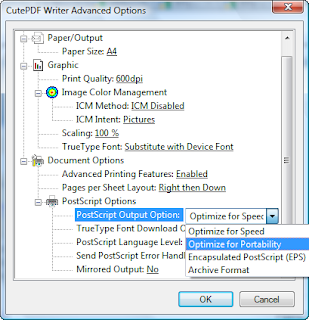
for my cute PDF, (always using this for later printing) i use optimize for portability as follows:
1. press ctrl + P for printing menu
2. select CutePDF Writer printer
3. click Preferences > Advanced and click at PostScript Options
4. there are Optimize for speed as default value
5. Select Optimize for portablity and now you can print at actual size. (see screenshot)


thats all. hope this will help.

Monday, January 11, 2010

can ping IP address but cannot browse - settled

i have big problem tomorrow and fixed it today. yess!. the problem is i'm accidently remove winsock2 registry entries to fix another problem but big problem arise.

i've refered to this website and giving me some idea

when i tried to browse internet it shows that page cannot be displayed or connection error. when try to ping, it replies when enter an ip address but cannot resolve ip when enter hostname or domain for example. ping yahoo.com ping google.com failed. ping 192.168.1.1 success.

after doing some search (using another computer, :( i've tried all the steps but not working.

final solution is easy.
1. go to network connection and right click at wireless network connection or local area connection. select properties.

2. click install > protocol > and click add

3. click Have Disk

4. type c:\windows\inf into copy manufacturer's files from.

5. select Internet Protocol (TCP/IP) and continue. this will reset your TCP/IP network configuration and all problems gone.

try first and leave a comment if not able to solve probelm

Menukar password root linux

Sekiranya server linux kehilangan password root atau telah ditukar oleh seseorang yang tidak dikenali, kita boleh menukar semula kata laluan root dengan mengikuti langkah di bawah. contoh diberikan bersama gambar yang dipetik dari laman web lain.

untuk rujukan bahasa inggeris sila lawati:
http://linuxgazette.net/107/tomar.html

1. semasa paparan GRUB dipaparkan tekan 'e' untuk mengubah command line


2. pilih pilihan kedua atau yang ada perkataan kernel dan tekan kunci 'e' sekali lagi.

3. tambah perkataan ' single' atau ' 1' tanpa penutup kata. pastikan ada ruangan kosong sebelum perkataan single atau 1. ini untuk masuk ke dalam sistem linux dengan pengguna tunggal.

4. sekiranya gagal, tambah init=/bin/bash di akhir perkataan.

5. tekan ENTER untuk teruskan. setelah itu tekan 'b' untuk masuk ke sistem linux dengan single user. anda akan masuk dengan akaun root

6. pada paparan root masukkan command passwd untuk menukar password root.

setelah itu, taip reboot untuk menggunakan server seperti biasa dengan password baru.

Sunday, December 27, 2009

Memasukkan colum ke dalam table menggunakan javascript

Tujuan : Memasukkan kolum baru ke dalam table menggunakan javascript.

<table width="800" border="1" id="jadual">

<tr>
<td>&nbsp;</td>
</tr>
</table>
<script>
// Memasukkan hello world ke dalam table jadual
// By apis17
function insert_column(){
try {
var jadual = document.getElementById("jadual");
var baris = jadual.insertRow(0);
var kotak = baris.insertCell(0);
kotak.innerHTML = "Hello world!";
}
catch (ex) {
// mengesan javascript error
alert(ex);
}
}
</script>
<label>
<input onClick="javascript:insert_column();" type="submit" name="button" id="button" value="Submit">
</label>

Related Posts Plugin for WordPress, Blogger...