Showing posts with label windows. Show all posts

Thursday, September 29, 2011

Wednesday, September 28, 2011

[tips] pord forward on windows XP

windows xp do not have internal function to do port forward. i found simple (super duper small) program to complete this task:

www.quantumg.net/portforward.php

you can download here: http://www.quantumg.net/portforward_bin.zip

source code also available at the website. thank you for the usefull tiny program.

Wednesday, May 25, 2011

Monday, June 28, 2010

ICS on windows 7

if you want to share internet connection using ICS from windows 7 to another windows 7 ICS connection, you maybe receive ip 192.168.137.1 is being used by other connection.

you can change this ip anyway into other address to prevent conflict. there are some registry hack available from this location

http://www.windowsnetworking.com/kbase/WindowsTips/WindowsVista/RegistryTips/RegistryHacks/ChangingtheDefaultIPAddressofICSinVista.html

HKEY_LOCAL_MACHINE\SYSTEM\ControlSet\Services\SharedAccess\Parameters
HKEY_LOCAL_MACHINE\SYSTEM\ControlSet001\Services\SharedAccess\Parameters
HKEY_LOCAL_MACHINE\SYSTEM\ControlSet003\Services\SharedAccess\Parameters


change into different IP address to enable internet sharing from WLan to Ethernet. this works for me! :)

Saturday, May 01, 2010

wget in windows

recently i having problems when download large files and connection temporarily stops at 90%. that make me crazy to wait more until i found solution on how to continue your download.

i'm using google chrome and download ubuntu 10 64bit. waiting about 3 hours @ 44kB/s. at 90%, connection disconnect and download stops at 449MB. damn. i'm searching in google and found this solution.


for all having same problem you can download wget.exe for windows in this website


copy into c:\windows folder and use wget -c http://[url] to continue. -c switch is for continue current downloads.

C:\Users\user>wget -c http://ubuntu.lagis.at/releases/lucid/ubuntu-10.04-desktop
-amd64.iso
--2010-05-01 12:43:08-- http://ubuntu.lagis.at/releases/lucid/ubuntu-10.04-desk
top-amd64.iso
Resolving ubuntu.lagis.at... 83.164.133.196
Connecting to ubuntu.lagis.at|83.164.133.196|:80... connected.
HTTP request sent, awaiting response... 206 Partial Content
Length: 731453440 (698M), 232082942 (221M) remaining [application/x-iso9660-imag
e]
Saving to: `ubuntu-10.04-desktop-amd64.iso'
now i'm continue download rest 10%. that's save my bandwidth :) thank you wget.

Tuesday, January 12, 2010

Google chrome print very small - fixed

Currently i'm using google chrome to browse internet, make payment and print some recipt after payment has been made. there are problem here because google chrome does not have printing preference like other browser (ie & firefox). i'm not able to print into actual size and all my recipt are very small :)


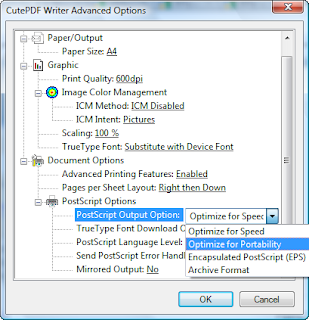
for my cute PDF, (always using this for later printing) i use optimize for portability as follows:
1. press ctrl + P for printing menu
2. select CutePDF Writer printer
3. click Preferences > Advanced and click at PostScript Options
4. there are Optimize for speed as default value
5. Select Optimize for portablity and now you can print at actual size. (see screenshot)


thats all. hope this will help.

Monday, January 11, 2010

can ping IP address but cannot browse - settled

i have big problem tomorrow and fixed it today. yess!. the problem is i'm accidently remove winsock2 registry entries to fix another problem but big problem arise.

i've refered to this website and giving me some idea

when i tried to browse internet it shows that page cannot be displayed or connection error. when try to ping, it replies when enter an ip address but cannot resolve ip when enter hostname or domain for example. ping yahoo.com ping google.com failed. ping 192.168.1.1 success.

after doing some search (using another computer, :( i've tried all the steps but not working.

final solution is easy.
1. go to network connection and right click at wireless network connection or local area connection. select properties.

2. click install > protocol > and click add

3. click Have Disk

4. type c:\windows\inf into copy manufacturer's files from.

5. select Internet Protocol (TCP/IP) and continue. this will reset your TCP/IP network configuration and all problems gone.

try first and leave a comment if not able to solve probelm

Monday, December 21, 2009

Connect to ad-hoc wireless automatically on restart

Today i want my computer to prepare ad-hoc connection every time starting windows vista. It's not a problem in windows XP but in Vista automatic connect for ad-hoc connection is not available. So, after google some solution i've found this:

netsh.exe wlan connect name=Profile2

where Profile2 is connection name.


i've used solution 2 because it will start in 2 minutes after finishing loading all windows components. so the popup menu will appear in just second.

Sunday, November 25, 2007

Uninstall Trend Micro PC-Cillin Successfully

No password required during uninstall
clipped from www.computing.net
Subject: Trend Micro uninstall password
Name: yugocrazy
Date: January 24, 2006 at 02:10:19 Pacific
Subject: Trend Micro uninstall password
OS: w2k
CPU/Ram: 550/192
Comment:
Does anyone know howto remove Trend Micro virusbister corporate edition without the uninstall password?

Cheers.


Report Offensive Message For Removal
Name: Ribett
Date: February 17, 2006 at 10:11:41 Pacific
Subject: Trend Micro uninstall password
Reply:
Find HKLM\SOFTWARE\TrendMicro\PC-cillinNTCorp\CurrentVersion\Misc. and set "Allow Uninstall" = 1


Report Offensive Follow Up For Removal
blog it

Monday, January 22, 2007

Screen clipping taken: 22/01/2007, 01:28 PM


Screen clipping taken: 22/01/2007, 01:28 PM


Microsoft Office Groove 2007


Kenapa perlu menggunakan office groove 2007?

Untuk memudahkan perhubungan sekiranya berlainan tempat dan perlu melakukan kerja yang sama. Contohnya saya telah membuat satu workspace untuk unit ict bagi memberitahu sekiranya terdapat apa-apa perubahan yang berlaku ke atas fail. Workspace tersebut boleh di dapati daripada email saya sekiranya berminat untuk mengeksplore bersama. Anda juga boleh membina workspace sendiri tetapi perlu menginstall office 2007 dahulu kerana ianya mempunyai banyak kelebihan bagi pengguna yang sentiasa berada di luar pejabat dan boleh melakukan kerja sama sahaja seperti di pejabat.


Sekali lagi office memudahkan kerja dan tidak perlu lagi berkejar ke sana sini untuk menghantar sekeping disket. Teknologi internet banyak membantu memudahkan kehidupan seharian di samping idea baru dari Microsoft dan apis.. hehe.. sekian


Nota ini ditulis daripada ms word 2007 dan dipublish secara automatik. Screen clipping pula diambil menggunakan office one note. Saya akan menyarankan en. Nawi supaya menggunakan One Note kerana beliau selalu terlupa apa yang akan dilakukan dan pernah bertanya kepada saya program untuk mengingatkan sesuatu. J


Monday, January 22, 2007

01:29 PM

Thursday, June 16, 2005

Samba Connection

This will enable your linux connection to windows OS and share files under Microsoft Network (My Network Places).
1. Edit /etc/samba/smb.conf and uncomment [#] the workgroup = Mygroup
encrypt passwords = yes
smb passwd file = /etc/samba/smbpassword

Thats all
:)

Saturday, April 02, 2005

My Personal Web Server

The first thing that you need for creating your own webserver is apache server that can be downloaded from http://www.apache.org .This server will open port 80 on your computer for local intranet or the internet.

After that, you can reach your webserver using internet gateway ip. You can obtain this ip using two different command: for windows XP "ipconfig /all" and for windows 9x or ME use "winipcfg" instead.

Any question about connecting your computer via internet, please ask me at apis17@hotmail.com

That's all, for now :)
Related Posts Plugin for WordPress, Blogger...