
Monday, May 17, 2010


Sunday, May 09, 2010
Ubuntu - Run gedit using root
to run gedit in root mode, press Alt+F2 and type gksudo gedit
to browse file in root, also press Alt+F2 and type gksudo nautilus
Saturday, May 01, 2010
wget in windows
recently i having problems when download large files and connection temporarily stops at 90%. that make me crazy to wait more until i found solution on how to continue your download.
i'm using google chrome and download ubuntu 10 64bit. waiting about 3 hours @ 44kB/s. at 90%, connection disconnect and download stops at 449MB. damn. i'm searching in google and found this solution.
for all having same problem you can download wget.exe for windows in this website
copy into c:\windows folder and use wget -c http://[url] to continue. -c switch is for continue current downloads.
now i'm continue download rest 10%. that's save my bandwidth :) thank you wget.C:\Users\user>wget -c http://ubuntu.lagis.at/releases/lucid/ubuntu-10.04-desktop-amd64.iso--2010-05-01 12:43:08-- http://ubuntu.lagis.at/releases/lucid/ubuntu-10.04-desktop-amd64.isoResolving ubuntu.lagis.at... 83.164.133.196Connecting to ubuntu.lagis.at|83.164.133.196|:80... connected.HTTP request sent, awaiting response... 206 Partial ContentLength: 731453440 (698M), 232082942 (221M) remaining [application/x-iso9660-image]Saving to: `ubuntu-10.04-desktop-amd64.iso'
Thursday, April 29, 2010
Installing git on Ubuntu
after several days wondering how to upgrade git on ubuntu (to test Chromium OS) this is my solution.
$ sudo apt-get build-dep git-core git-doc
$ wget http://kernel.org/pub/software/scm/git/git-1.7.0.6.tar.bz2
$ tar -xvjf git-1.7.0.6.tar.bz2
$ cd git-1.7.0.6/
$ make prefix=/usr/local all doc
$ sudo make prefix=/usr/local install install-doc
$ which git
/usr/local/bin/git
$ git --version
git version 1.7.0.6
doc is optional.
now i proceed to chromium install :)
Tuesday, January 12, 2010
Google chrome print very small - fixed
Currently i'm using google chrome to browse internet, make payment and print some recipt after payment has been made. there are problem here because google chrome does not have printing preference like other browser (ie & firefox). i'm not able to print into actual size and all my recipt are very small :)
the solution is disable fast draft print : http://www.google.com/support/forum/p/Chrome/thread?tid=761bf9c466615340&hl=en
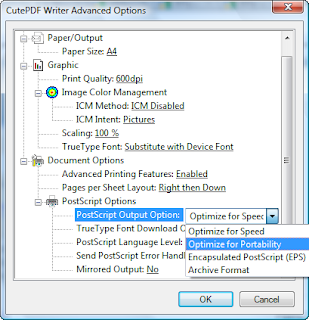
for my cute PDF, (always using this for later printing) i use optimize for portability as follows:
1. press ctrl + P for printing menu
2. select CutePDF Writer printer
3. click Preferences > Advanced and click at PostScript Options
4. there are Optimize for speed as default value
5. Select Optimize for portablity and now you can print at actual size. (see screenshot)
thats all. hope this will help.
Subscribe to:
Posts (Atom)
